Deinstallation
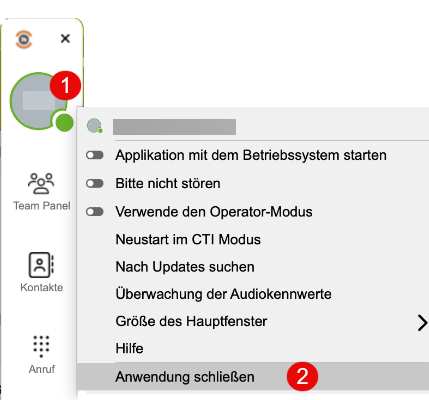
1.Mia Phone beenden, falls die Anwendung noch ausgeführt wird
1.Auf Benutzerstatus klicken
2.Anwendung schließen
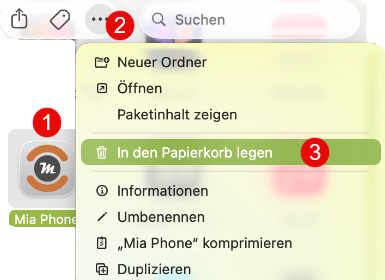
2.Über den Finder „Programme“ öffnen & die App in den Papierkorb legen
1.App Mia Phone auswählen
2.über das 3-Punkte-Menü "..."
3.in den Papierkorb legen
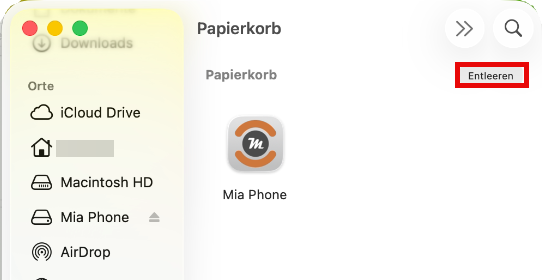
3.Optional den Papierkorb leeren
Manche Einstellungen oder Lizenzinformationen bleiben eventuell erhalten.
Diese befinden sich hier:
~/Library/Preferences/miaphone
Dieser Ordner kann ebenfalls gelöscht werden, wenn alle Daten entfernt werden sollen.
Warum es keine separate Deinstallation gibt
•Eine .dmg-Datei ist auf macOS kein klassischer Installer, sondern ein Disk-Image, das die App-Dateien enthält.
•macOS-Anwendungen sind selbstständige App-Bundles.
•Durch das Löschen des App-Bundles wird die Software in der Praxis vollständig entfernt.